
The dance formation maker is for choreographers, dance teams, K-pop cover groups and cheer coaches who plan where everyone stands before rehearsal. It is free in any phone or computer browser, with no sign-up and no watermark: set the stage in metres, add 2 to 40 dancers, build up to 24 formations and download a PNG, an animation video or a share link. Nothing is uploaded; the plan stays in your browser.
How to make a dance formation chart
- 01
Set the stage and the cast
Enter the real width and depth of the stage in metres (3–30 m), set the number of dancers, and paste their names one per line if you have a list.
- 02
Build the first formation
Pick one of the 10 templates (line, two lines, windows, V, pyramid, diagonal, circle, block, arrow or split), then drag any dancer to adjust. Snap to ¼ m keeps spacing even.
- 03
Add the next formation and its counts
Add a formation for each section of the song, set how many counts the dancers take to walk there and how many they hold it, and set the tempo in BPM.
Dance formation templates by group size: 4, 5, 7, 9, 12 and 30 dancers
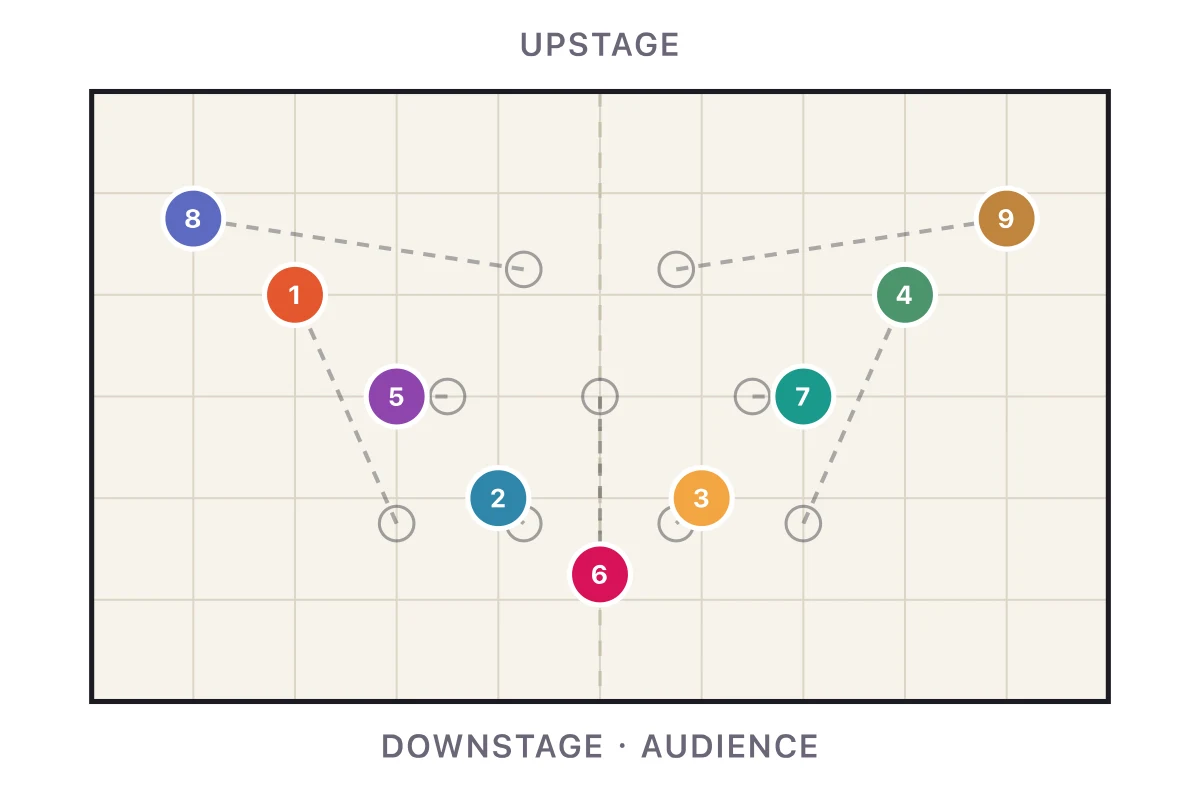
Dance formation templates in this planner adapt to any group from 2 to 40 dancers: pick a card and every dancer gets a spot sized to your stage. The charts below are what the cards give for common group sizes, from a 4 people dance formation to a dance formation for 30 people. Set the number of dancers and the stage size, then pick the same card to start from any of them.
| Group size | Cards that work well | What to watch |
|---|---|---|
| 2–4 dancers | Line, two lines, Pyramid (a diamond at four) | Leave at least 1 m between dancers who travel |
| 5–9 dancers | V shape, windows, arrow, diagonal | Keep the centre spot on the dashed centre line; odd numbers give a single point to the V |
| 10–16 dancers | Windows, block, split, circle | Stagger rows so nobody hides behind the person in front |
| 17–40 dancers (cheer, school shows) | Windows, block, Pyramid, split | Enter the real floor size; the planner warns when dancers end up less than half a metre apart |
Is there a free dance formation maker with no sign-up?
Yes: this dance formation maker is completely free, with no sign-up, no paid tier and no watermark on the PNG or the video. Every feature on the page is open: up to 40 dancers, up to 24 formations, animated transitions, the crossing check, PNG and video downloads and the share link. It costs nothing because it runs in your browser and never sends your plan to our server.
| Question | Answer for this planner |
|---|---|
| Price | Free, no credits used |
| Account | Not needed |
| Watermark | None on the PNG or the video |
| Limits | 40 dancers, 24 formations, stage 3–30 m each way |
| Downloads | PNG of the current formation; animation as MP4 or WebM, depending on the browser |
| Saving | In your browser, plus a share link that holds the whole plan |
Can I use a dance formation maker online without an app?
Yes: this dance formation maker works online in Chrome, Safari, Edge or Firefox on a phone, an iPad, a Windows laptop or a Mac, so there is no dance formation app to install. Dancers open the share link in their own browser with no account. A computer or tablet is easier for large casts, because 40 dots on a phone screen are small; on a phone, turn it sideways and drag with a finger.
Once the page has loaded, editing keeps working without a connection and saves to the browser; only opening the page itself needs the internet. The planner does not sync between devices, so move a plan from your phone to your laptop with the share link.
How do I use a K-pop dance formation maker to turn 7 members into 5?
A K-pop dance formation maker helps by letting you rebuild each formation of the original for your own headcount: set the planner to 5 dancers, recreate the shape of each section (a V, windows or a line) with the template cards, and keep the centre spot for whoever has the lead part in that section. A 4-3 windows formation for seven usually becomes a 3-2 windows for five; a 7-member V becomes a 5-member V with one fewer dancer on each arm.
Work section by section: add one formation per part of the song, name it after the part (Verse 1, Chorus, Bridge) and set its counts. When a part needs a member who is not there, give the centre to the next lead and move the others one place along the line, rather than leaving a gap where the missing members stood. Play the transitions to check that the new centre can reach their spot in the counts they have. The same steps work the other way, for a 9 member dance formation adapted from a smaller group.
Fixing dance formation transitions when dancers cross paths
The planner draws a straight path from where each dancer stood in the previous formation to their new spot, and marks paths that cross in red. Press Fix crossings and it keeps every spot of the new formation but changes who goes to which spot, so that the total walking distance is as short as possible; the shortest set of straight paths never crosses.
If a dancer has to take a particular spot (the centre, a lift, a solo), fix the crossings first and then drag that dancer back. Other ways to keep transitions clean: give the dancers who travel furthest a few more counts, let one row move before the next, and move through the gaps of a windows formation instead of through people.
Dance formation maker free vs Sway, ArrangeUs, FORMI and Coryo
The first row is this site’s own planner; it has no connection with the other four, and their details come only from their own websites (checked 12 November 2026). Choose by how you work: a team that needs accounts and shared editing will want one of the apps, while a single choreographer planning a piece in a browser can use the free planner on this page.
| Tool | Where it runs | Free version | Paid plans on its site |
|---|---|---|---|
| This page (Genjutsu AI) | Any browser, no account | Everything: 40 dancers, 24 formations, transitions, PNG, video, link | None |
| Sway Formations | Web and iOS apps | Up to 15 members, 2 captains, 3 segments and 1 project | Plus $4.99/mo (30 members); Pro $9.99/mo; billed per team, not per dancer |
| ArrangeUs | App you download | Free to download and use, up to 60 dancers per choreography, PDF export | Premium adds Music Mode and more; price not listed on its home page |
| FORMI Studio | Browser, best on desktop | Up to three performances on the free Starter plan | Not listed on its home page |
| Coryo free formation maker | Browser, no account | One formation at a time, up to 40 dancers, PNG and share link; its full editor is in a free plan | Not listed on the tool page |
What this dance formation maker cannot do
This dance formation maker plans positions and paths only. It does not import music: you set a tempo in BPM and count each move in beats, so line the counts up with your song by ear. It has no 3D view or audience camera, no shared editing for several choreographers, no per-dancer accounts and no AI that writes formations for you. Paths are straight lines with an easing, not curves you can bend.
It also does not teach steps or make dance videos. If you want a video of yourself or a photo of a friend in a dance, that is a different tool: the motion transfer editor puts a person from a photo into an existing dance clip, and the AI couple dance video generator makes a two-person dance from two photos. Both use paid credits, shown on the pricing page; this planner does not.
Last updated: 2026-11-12