Same shot, your product

Genjutsu Object Swap: Put Your Product in a Finished Shot

Yes, you can replace a product in an existing ad and keep the hands, camera movement and timing: choose Product, add two or three photos of your item, and Seedance 2.5 edits the selected cut so only the object changes. Small label text, logos and tight finger grips are the parts most likely to drift, so check every frame. Genjutsu AI is an independent Genjutsu-style editor, not Higgsfield.

  • Keeps hands and contact points
  • Product photos skip face review
  • 16:9 ads and 9:16 cut-downs
  • One object per generation
What do you want to change?

Put your product where the original one was. Hands, camera and timing stay.

Reference images0/9

Up to 9. In your instruction, call them Image 1, Image 2 and so on. JPG, PNG or WebP · up to 10 MB · 300–6000 px per side.

0/800

Seedance 2.5 edits your clip directly, so motion, camera and framing stay closest to the source. Up to 30 seconds.

视频时长
分辨率

Output: 16:9 · 1280×720

消耗 175 积分

Your uploads are not published. They are shared with the video provider for checks and generation. Privacy policy

Clip start time00:00 – 00:10
00:0000:10

Motion-transfer reference footage, not results from this tool. Pick a window, add your photos and change what you like.

How to swap a product in an ad

  1. 01

    Pick the ad clip

    Upload the finished ad or demo (MP4/MOV, 5 s–5 min, 50 MB) or start from the built-in Drink commercial.

  2. 02

    Choose the shot

    Set a 5, 10, 15 or 30-second window around the moment the product is handled.

  3. 03

    Add product photos

    Choose Product and add two or three photos of your item on a plain background, label readable.

  4. 04

    Name the object

    Say which object changes, for example "Replace the glass he drinks from with the can in Image 1."

  5. 05

    Generate and check

    Use Seedance 2.5 for the closest match, generate, then check hands, logo and label frame by frame.

Object swap at a glance

ItemValue
What changesThe featured product or object: shape, colours, materials, label
What stays

Hands, contact points, how it is held or used, camera path, timing, scene, audio

References

1–9 product images, 10 MB each; sent as plain images, without the face review used for people

Length and output5–30 s (15 s on reference models), 480p–1080p, source shape kept
Cost

10 s with Seedance 2.5: 175 credits at 720p, 310 at 1080p

Object swap vs motion transfer

Object swap (Product)Motion transfer (Character)
What changesThe object in the shotThe person in the shot
What you uploadProduct photosPhotos of the new person
Reference images go through asset review before Seedance 2.5NoYes
Typical useAd variants, product demos, packaging updatesDance trends, recasting, character swaps

To change the person instead, see motion transfer.

Product photo checklist

  • Plain, uncluttered background.
  • Two or three angles: front, side and the view the clip shows most.
  • Label and logo readable in at least one photo.
  • Similar size and shape to the original object; a much larger or smaller item drifts more.
  • 300–6000 px per side, JPG, PNG or WebP.

What stays reliable and what can drift

ReliableCan drift
Hand position and how the item is heldFingers wrapped tightly around the item
Camera path and timingFast rotation that reveals unseen sides
Overall shape, colour and materialSmall label text, thin logos, fine print
The scene around the objectReflections on glass and metal

Product prompts

Drink ad
Replace the glass he drinks from with the can in Image 1, matching the label from Image 2. Keep how he lifts and tilts it.
Handbag reveal
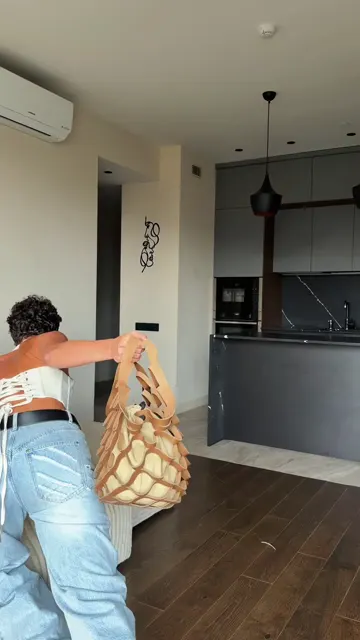
Replace the woven handbag with the leather bag in Image 1, using the clasp detail from Image 2. Keep how she picks it up and turns it.
Phone demo
Replace the phone in her right hand with the phone in Image 1. Keep the screen dark and her thumb movement unchanged.

Built-in clips for product tests
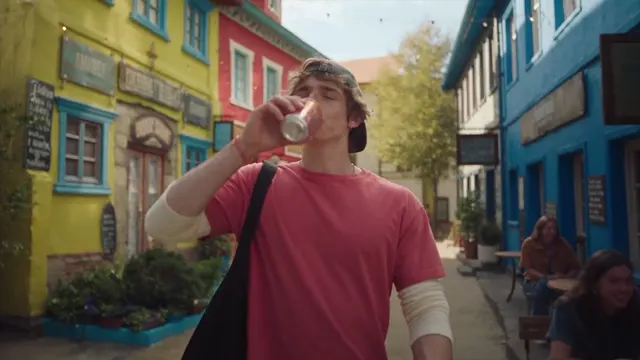
Drink commercial
Drink commercial10 秒 · 16:9 · 1 位主角
Handbag reveal
Handbag reveal7.2 秒 · 9:16 · 1 位主角

Credits for product swaps

Model · resolution5 秒10 秒15 秒30 秒
Seedance 2.5 · 480p3978117233
Seedance 2.5 · 720p88175262523
Seedance 2.5 · 1080p155310464928
Seedance 2.0 · 480p275481—
Seedance 2.0 · 720p58116174—
Seedance 2.0 · 1080p146291436—
Seedance 2.0 Mini · 480p5913—
Seedance 2.0 Mini · 720p101928—

The quote is shown before you generate and charged once; failed or rejected jobs refund. Credits come from any plan or credit pack.

最近更新: 2026-10-06

Object swap questions

Can I replace a product in an existing ad and keep the hands?

Yes. Choose Product, add photos of your item and name the object to replace. The edit keeps the hands, contact points, how the item is held, the camera path and the timing. Tight finger grips and fast rotation are the hardest moments and can change for a few frames.

Can I change a logo in a video?

You can replace a branded product or sign with your own from reference images, and the new logo usually follows the object. Logos and small packaging text are not guaranteed to stay exact in every frame, so check the result before publishing.

Will the label text stay exactly the same?

Not guaranteed. Large shapes, colours and materials reproduce well; small text, fine print and thin logos can blur or change between frames. Include a close, readable photo of the label among your references.

Which model is best for product swaps?

Seedance 2.5, which edits the cut itself and keeps hands and camera closest to the source (175 credits for 10 seconds at 720p). Use Seedance 2.0 Mini for cheap drafts.

Can I swap something that is not a product, like a sign, phone or car?

Yes. Product mode replaces any featured object. Name it clearly ("the phone in her right hand") and change one object per generation.

Can I reuse someone else’s ad?

Only if you have the rights to edit and publish that footage. The tool does not grant rights to source clips, logos or music.

Keep the take. Change the world in it.

Pick a clip, add your references and see the edit in a few minutes. The quote is shown before you generate.

Open the Genjutsu AI editor